- Tuesday, 22 Feb 2011:
Wisdom comes from deliberate reflection
- Sunday, 7 Feb 2010:
Exceptional HTTP status codes in Django
- Tuesday, 20 Oct 2009:
Simple search for Django using Haystack and Xapian
- Friday, 24 Jul 2009:
Implementing deferred registration (or lazy registration) with Django
- Tuesday, 24 Mar 2009:
Ada Lovelace Day
- Wednesday, 25 Feb 2009:
Reinstall
- Wednesday, 19 Nov 2008:
The Open Rights Group
- Sunday, 21 Sep 2008:
Interface magic
- Thursday, 11 Sep 2008:
Improvising makes me gulp
- Tuesday, 2 Sep 2008:
Thoughts on Google Chrome
- Published at
- Tuesday 22nd February, 2011
The latest flurry of doom-saying to hit the web is over the use (and particularly twitter’s use, although they’re not alone by any means) of “hashbangs”. This just means URI fragment identifiers that start with ! (so the URI displayed in the browser contains #!), and then using Javascript to figure out what to load on top of the basic HTML to give the desired content.
Twitter have been doing this since they rolled out #newtwitter, their application-like refresh of their website back in September of last year; the root of this sudden interest seems to be Mike Davies’ Breaking the Web with hash-bangs, with the negative side picked up by people as diverse as Jeremy Keith in the charmingly-titled Going Postel and Tim Bray with Broken Links. The flip side, supporting the use of hashbang (although generally with caveats, since pretty much everyone agrees they should be a temporary hack only) is also widespread, with one of the most straightforward rebuttals being Tom Gibara’s Hashbang boom.
One of the problems with this debate is that many people weighing in are setting up a dubious dichotomy between “pragmatism” (we must use hashbang to serve our users) and “correctness” (we must not use hashbang to avoid breaking things). Reading some of the posts and comments it struck me that a fair number of people were jumping in with their opinions without taking the time to really understand the other side; in particular there are a fair number of glib justifications of both positions that are, sadly, short on facts. As Ben Ward said when he weighed in on this issue:
Misleading errors and tangents in vitriolic argument really don't help anything, and distract us from making a clearly robust case and documenting the facts of a risky methodology.
And there are a lot of facts. It’s taken me a week to get to the point of writing this, the first in what I suspect will become four or five different articles. Part of the problem is that there is a lot going on in a complete web stack these days, from various Javascript APIs in the browsers, down through URIs and HTTP to the bits, packets and so on that make up the internet. Almost no one can hope to properly grasp all the aspects of this in their day to day work (although we must try, an issue I plan to get to around volume 6 ;-). Hence, I’ve been reading, researching and testing like crazy in what little time I’ve had outside my day job.
Pretty much everything I’ve uncovered will be known by some or even many people; some of it is even well-discussed on the internet already. Hopefully by bringing it all together I can provide a little structure around some of the things we have to contend with when building modern websites and web apps. I’ve tried to assume as little knowledge as possible; this is a series of articles rather than a blog post, so if the earlier commentary seemed too distinct from your experience and the problems you face, perhaps this will be more accessible.
tl;dr
I’m trying here to present the facts objectively and to explain why this is a difficult issue. However I have my own opinions, which will come out across the course of this series. Not everyone is going to want to wade through the whole article (let alone a number of them) though, so here’s the bullet.
- hashbangs are bad
- hashbangs are necessary sometimes, right now
- hashbangs will be with us longer than we want
- hashbangs aren’t needed as often as some people think; there’s a happy medium to be found
That last is going to take some getting to; in this article I lay out the foundation, but I can’t demonstrate where I feel that happy medium lies nearly so quickly. To do that properly is going to take time, and if we’re going to do that, let’s start at the beginning. How do web apps different from websites; and how do they differ from other apps?
Websites and web apps
web site - A collection of HTML and subordinate documents on the World Wide Web that are typically accessible from the same URL and residing on the same server, and form a coherent, usually interlinked whole
In software engineering, a web application is an application that is accessed via a web browser over a network such as the Internet or an intranet
An application is "computer software designed to help the user to perform singular or multiple related specific tasks"
When we talk about a web app, what we mean is an application, something you use to do something or another (write a presentation, chat online or whatever), which you use via a web browser. Up comes the web browser, you point it at the web app, and away you go. Everything beyond that is irrelevant; you can have a web app which doesn’t use the network beyond delivering the app in the first place. Most will use the network once they’re running, to save state, to communicate information between different users, and so on; and most of what we’re talking about here really only applies to those that do.
Ben Cherry, a Twitter developer, discusses this a little in his own take on hashbang, where he makes the argument that what we’re seeing is just a natural result of the rise of the web app. I agree with this, but I disagree with some of the other things he says, in particular:
Web domains are now serving desktop-class applications via HTTP
[Twitter] is simply an application that you happen to launch by pointing a browser at http://twitter.com
I think the two of these together miss the two fundamental differences between web apps and more traditional desktop or mobile applications, even when all of them use the network for fetching data and providing communications layers with other users:
- you don’t install a web app; you just navigate to it and it becomes available
- the browser environment is impoverished compared to other substrates; web apps are not (yet) “desktop-class”
- web apps are part of the web, and hence may be made linkable
Note that the last point says may be made linkable; there’s no requirement. However it is the most important; in my opinion this is the single thing that makes web apps significantly more powerful than traditional desktop apps.
Cherry notes that URLs bring benefits like bookmarks […]
, before sadly leaving the topic to talk about other things. His arguments in favour of using hashbangs are pretty robust, but that linkability is really what’s bugging everyone who’s against them, and I haven’t found a completely cogent argument that it’s irrelevant. The best is a kind of pragmatism line: since hashbangs work in the majority of web browsers, and Google has provided a way for web crawlers to get the content, and since this will all go away once the draft HTML5 History API is widely supported, we shouldn’t worry too much. But people clearly are worrying, so we should try to figure out why.
At the heart of this is a tension between supporting deep linking while providing the increased functionality that web apps allow. Some people also raise an argument about performance, which I’ll get to much later in this series.
Deep linking: the people are upset
"Deep linking" is a phrase that was familiar a few years ago for a series of court cases where some publishers tried to prevent other sites from directly linking (deep linking) to the juicy content, enabling users to bypass whatever navigation or site flow the original publishers had in place. As the Wikipedia article points out, the web’s fundamental protocol, HTTP, makes no distinction between deep links or any other kind; from a traditional HTTP point of view a URI points to a resource, and user agents know how to dereference (look up) this to get hold of a copy of that resource (technically, it’s called a resource representation).
Note that I say “user agents” rather than “web browsers” (I’ll often call them web clients from now on, in comparison to web servers). We’ll come back to that later.
Changing fragments
The problem with hashbangs and deep linking is that they require user agents to understand more than basic HTTP. The hashbang works by giving meaning to a specific part of a link called the fragment identifier; the bit after the # character. Fragment identifiers are defined in section 3.5 of RFC 3986, although the details don’t really matter. What’s important is that the fragment and the rest of the URI are handled separately: the “main” part of the URI is sent to the web server, but the fragment is handled only by the web client. In RFC 3986’s somewhat dry language:
the identifying information within the fragment itself is dereferenced solely by the user agent
This is all fine the way they were originally used with HTML; fragment identifiers typically map to “anchors” within the HTML, such as the one defined using the <a> tag in the following snippet:
<dt><a name="adef-name-A"><samp>name</samp></a> = <em>cdata</em> [CS]</dt>
<dd>This attribute names the current anchor so that it may be the destination
    of another link. The value of this attribute must be a unique anchor name. The
    scope of this name is the current document. Note that this attribute shares the
    same name space as the <samp>id</samp> attribute.</dd>
(sanitised from the HTML 4.01 spec marked up as HTML)
With that HTML fragment as part of http://www.w3.org/TR/html401/struct/links.html, anyone else could link to http://www.w3.org/TR/html401/struct/links.html#adef-name-A and any web client could download from the URI (without the fragment), and find the relevant bit of text within it (by looking for the fragment inside the HTML). This is what Tim Bray is talking about in the first example in How It Works (see the fragment coming into play?).
What’s happened since then is that people have come up with a new use of fragments; instead of marking places within the resource representation (in this case, the HTML), they are hints to Javascript running in the web client as to what they should display. In the case of twitter, this often involves the Javascript looking at the fragment and then loading something else from twitter’s API; the information you’re looking for is often not in the HTML in the first place.
The reason they do this is that changing the fragment doesn’t change the page you’re on; you can change the fragment from Javascript and web clients won’t load a different page. This means that as you navigate through content in your web app, you can change the fragment to match the content you’re looking at — so people can copy that link as a bookmark or send to other people. When you go back to that link later, the Javascript on the page can check the fragment and figure out what content to load and display.
This changes the meaning of a fragment from content to be located in the page to content to be loaded into the page. The fragment is now providing information for what is termed client-side routing, by analogy with the normal server-side job of figuring out what content is desired for a particular URI, termed routing in many systems such as ASP.NET and Ruby on Rails.
The problem
Simply put, if you aren’t running the page’s Javascript, then a URI designed for client-side routing doesn’t lead you to the intended content. There are various reasons why this might bite you, and the most visible reason is if you’re Google.
An interim solution
Hashbang is a system introduced by Google to try to mitigate the pain of client-side routing described above, specifically that it makes it difficult or impossible for search engines to index such systems (which for historical and utterly confusing reasons are sometimes referred to as AJAX applications). Hashbangs are an ad-hoc standard that allows web crawlers working for Google, Bing or whoever, to convert a URI with a hashbang into a URI without a hashbang, at which point they can behave as if the client-side routing weren’t there and grab the content they need.
It’s worth pointing out that this is strictly a short-term hack; there’s a nascent proposal called the History API that I mentioned earlier which would allow the same Javascript systems that are doing client-side routing to change the entire URI rather than just the fragment. Then you get all the advantages of web apps and client-side routing without the disadvantages. However we’re not there yet: the history API is only a draft, and probably won’t be implemented in Internet Explorer for some time yet. (Some people are railing against that, saying that it — and a number of other omissions — mean IE isn’t a modern browser in some sense; I really don’t want to get dragged into yet another tar pit argument, but it seems to me that Microsoft is actually being utterly sane in focussing on what they see as the most important challenges web browsers need to address; we can argue with their priorities, but it’s difficult to complain as we used to that they are sitting there doing nothing and letting IE stagnate.)
Creating a middle class
However in the meantime it means we’re moving down a slope of ghettoising web clients (or user agents as the specifications tend to call them). In the beginning, we had just one class of web client:
| Content | All web clients |
|---|
| Everything | Full access |
Then we got client-side routing, and we had two classes:
| Content | Javascript support | No Javascript support |
|---|
| Server-side routing | Full access | Full access |
| Client-side routing | Full access | No access |
With hashbangs, we’ve created a middle class:
| Content | Javascript support | Hashbang understanding but no Javascript support | No Javascript support |
|---|
| Server-side routing | Full access | Full access | Full access |
| Client-side routing using hashbangs | Full access | Full or partial access | No access |
| Client-side routing without hashbangs | Full access | No access | No access |
Note that Twitter’s approach to solve the “no access” case involves having another way of accessing their system without using Javascript. This almost but not quite closes the gap, and the kicker is once more deep linking.
Inside the hashbang ghetto
At first glance, there’s not much in the ghetto: web crawlers that haven’t updated to use hashbangs, and older web browsers that don’t support Javascript. It’s actually a bit more complex than that, but if you weigh up the costs of implementing things without hashbangs and decide it isn’t worth it to support the ghetto, that’s entirely your business. If it turns out you’re wrong, your web app will die, and it’ll be your fault; on the other hand, if you’re right you may have made it easier to provide the richer functionality that can set you apart from the rest of the herd and make your web app a huge success. Twitter have decided that the downside for them is sufficiently small to take the risk; and they’re probably right. But I’m not going to stop here, because this is where things start getting really interesting. The ghetto isn’t just dead browsers and antiquated search engines.
Here’s a slide from a talk I gave about three years ago.
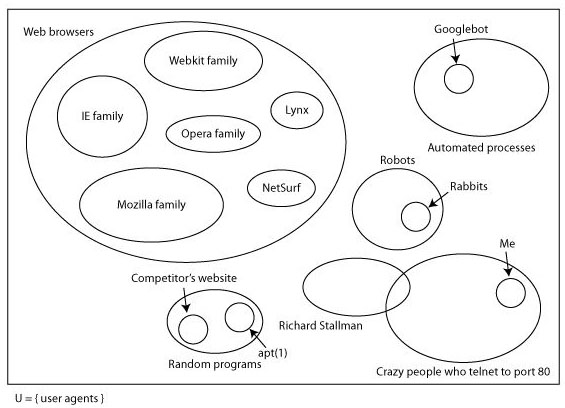
This is why I try not to talk about web browsers: there’s a huge space of other things that can talk HTTP. Some of them aren’t terribly important to web apps (robots like Nabaztag probably aren’t going to be reading twitter through their web app), and some of the concerns I was talking about (botnets and rent-a-hackers that competitors might hire to take down your site) don’t really mind whether you’re using hashbangs or not. But there are useful tools that, for instance, might scan links in your email and use them to categorise or flag things that are important to you. Chances are that they won’t implement hashbangs ever (some of them may no longer be maintained, although they’ll work perfectly well except in this case), in which case good luck having them work properly with any web app that does.
The problem here is that although it’s possible to be reasonably careful about user agents that hit your site from the beginning, by redirecting them to a non-Javascript version of the site for instance, this falls down when people are deep linking and sharing those links around. Let’s look at what actually happens to a ghetto user agent when it tries to dereference a Twitter hashbang URI. We’ll use this tweet from Dustin Diaz because it has a pretty map in it.
The URI is http://twitter.com/#!/ded/status/18308450276, so any user agent (except for crawlers using Google’s hashbang algorithm) will first request http://twitter.com/ and then apply the fragment. There are two possible responses from Twitter depending on whether you have an active #newtwitter session (ie whether you’re logged into an account that’s using newtwitter or not).
With newtwitter enabled, you get about 70K of HTML with embedded Javascript. Dustin’s tweet is nowhere to be found; it will be loaded by the Javascript. Without newtwitter, you get about 50K of HTML and Javascript; Dustin’s tweet is also nowhere to be found, but the first thing the Javascript does is to redirect to http://twitter.com/ded/status/18308450276, which gives you the tweet in about 13K of HTML and Javascript.
Any tool that wants to find out the contents of the tweet is going to have to either:
- understand hashbangs
- run some Javascript
- embed a full-featured web browser that runs Javascript
That’s a big step up from the days when we only had one class of web client, and that’s really what people on the correctness side of the argument are getting upset about. There are no end of tools already in existence that can speak HTTP but can’t cope with hashbangs; if you use client-side routing, these tools aren’t going to work with your web app.
You may decide this doesn’t matter, of course, but the ghetto is full of these tools, and I can guarantee you neither know about all of them, nor appreciate how some people are depending on them for their full appreciation of the web. (In that slide above, there’s a section for crazy people who telnet to port 80, something I do sometimes to try to figure out whether I can’t open your site because of problems with your web server, problems with my internet connection or, as seems to be increasingly the case, because Safari has gone mental for a bit and is just refusing to load anything. This is one of the least crazy non-standard uses of HTTP I can think of.)
It’s easy to fixate on the most obvious aspect of ghetto browsers: things that don’t understand Javascript. Many people have put a lot of effort over the past several years into the various arguments why having a site that works without Javascript is a good idea, but in the case of web apps people are ignoring all that because at first blush web apps don’t apply if you don’t have Javascript. Certainly a complex web app isn’t going to run without Javascript; however I think this is missing the point. Going back to the fundamental distinguishing feature of a web app, deep links can escape from the web app itself to float around the internet; I’d say this is an unambiguously good thing. But, as I think should be obvious by now, the deep linking problem has nothing to do with whether your web browser supports Javascript (or has it turned on); it’s really to do with the shift in meaning of fragments that Tim Bray complained about. These days there is meaning in them that can’t be divined by reading the HTML specification.
For instance, Facebook do a neat trick when you paste links into a Facebook message: they look at the page and pull out interesting information. They sometimes do this using the Open Graph protocol, which is rooted in spreading deep links around between different systems and having them pull data out of the resource representations at the end of them; sometimes they look for other hints. Part of the point of the Open Graph is that it’s not just Facebook who can pull stuff out of it; anyone can. There are libraries available, and when I checked recently none of them could cope with hashbangs. (It’s some small comfort that Facebook themselves have put hashbang support into their Open Graph consumption.)
I was discussing hashbangs last week with George Brocklehurst when he said:
Whenever I copy a twitter URI I have to remember to remove the hashbang.
All George is trying to do is ensure that URIs he’s moving around are as useful as possible; that he feels he needs to strip the hashbang suggests a deep problem.
The safe solution
For the time being, the safest approach is to limit client-side routing to parts of your web app that don’t make sense outside the app. Considering twitter, there are some things that you naturally want to link to:
- user profiles
- tweets
- user lists
and then there are parts of the app that don’t really make sense for anyone other than you, right now:
- your current main dashboard (latest tweets from your followers, local trends, suggestions of who to follow and so forth)
- live search results
and so on. Actually, even the latter ones tend to get separate (albeit hashbanged) URLs in Twitter; but since the first ones are the ones you are most likely to copy into an email, or Facebook, or heaven forbid back into Twitter, those are the ones that are most important.
Twitter handles this at the moment by changing the fragment and loading the information for that view in Javascript. The safe way of doing it is to do a page load on these “core objects” so that they have non-hashbanged URIs. (The HTML served in these cases could still load the Javascript for the Twitter app, most of which is cached and served from Akamai anyway.) For the reasons not to use the safe approach, we have to venture away from deep linking and into the other desire that web app builders have which, by analogy, we’ll call deep functionality; from there we’ll move on to look at performance, which will turn out to be a much more complex subject than it appears (or at least than it initially appeared to me when I started thinking about this, back when I thought it could be a single article).
But that’s all for the future. I’m well aware that by stopping at this point I’m leaving myself open to abuse because I’ve only addressed one side of the argument. Trust me, the other side is coming; please don’t clutter the internet with vitriol in the meantime.
- Published at
- Sunday 7th February, 2010
- Tagged as
Note that the extension this talks about has subsequently been renamed to django_exceptional_middleware.
Django has support for emitting a response with any HTTP status code. However some of these are exceptional conditions, so the natural Pythonic way of generating them would be by throwing a suitable exception. However except for two very common situations (in which you get default template rendering unless you’re prepared to do a bit of work), Django doesn’t make this an easy approach.
At the third /dev/fort we needed something to make this easy, which Richard Boulton threw together and I subsequently turned into a Django app. It allows you to override the way that exceptional status codes are rendered.
Usual HTTP status codes in Django
In Django, HTTP responses are built up as an object, and one of the things you can set is the HTTP status code, a number that tells your user agent (web browser, indexing spider, Richard Stallman’s email gateway) what to do with the rest of the response. Django has some convenient built-in support for various common status codes.
The default is 200 OK, which usually means “here’s your web page, all is well” (or “here’s your image” or whatever). This is the code that you get automatically when a Django view function spits out a response, often by rendering a template.
Another thing you often want to do is to issue a redirect, most commonly 301 Moved Permanently or 302 Found. For instance, you do this if you have an HTML <form> that POSTs some data, and then you want to direct the web browser (indexing spider, RMS’s gateway) to another page once you’ve done whatever updating action is represented by the POST data.
404 Not Found, which is usually the correct response when the URI doesn’t refer to anything within your system. Django handles this automatically if the URI doesn’t match anything in your Django project’s URLconf, and it’ll also emit it if you raise an Http404 exception in a view.
500 Internal Server Error, which Django uses if something goes wrong in your code, or say if your database is down and you haven’t catered for that.
For 200, your code is in control of the HTTP response entity, which is generally the thing displayed in a web browser, parsed by an indexing spider, or turning up in an email. For 301 and 302, the entity is ignored in many cases, although it can contain say a web page explaining the redirect.
For 404 and 500, the default Django behaviour is to render the templates 404.html and 500.html respectively; you can change the function that does this, which allows you to set your own RenderContext appropriately (so that you can inject some variables common across all your pages, for instance). Usually I make this use my project-wide render convenience function, which sets up various things in the context that are used on every page. (You could also add something to TEMPLATE_CONTEXT_PROCESSORS to manage this, but that’s slightly less powerful since you’re still accepting a normal template render in that case.)
I want a Pony!
Okay, so I had two problems with this. Firstly, I got thoroughly fed up of copying my handler404 and handler500 functions around and remembering to hook them up. Secondly, for the /dev/fort project we needed to emit 403 Forbidden regularly, and wanted to style it nicely. 403 is clearly an exceptional response, so it should be generated by raising an exception of some sort in the relevant view function. The alternative is some frankly revolting code:
def view(request, slug):
    obj = get_object_by_slug(slug)
    if not request_allowed_to_see_object(request, obj):
        return HttpResponseForbidden(...)
Urgh. What I want to do is this:
    def view_request, slug):
        obj = get_object_or_403(MyModel, slug=slug)
which will then raise a (new) Http403 exception automatically if there isn’t a matching object. Then I want the exception to trigger a nice rendered template configured elsewhere in the project.
This little unicorn went “501, 501, 501” all the way home
If you don’t care about 403, then maybe you just want to use HTTP status codes as easter eggs, in the way that Wildlife Near You does; some of its species are noted as 501 Not Implemented (in this universe).
get_object_or_403 (a disgression)
If you’ve used Django a bit you’ll have encountered the convenience function get_object_or_404, which looks up a model instance based on parameters to the function, and raises Http404 for you if there’s no matching instance. get_object_or_403 does exactly the same, but raises a different exception. Combine this with some middleware (which I’ll describe in a minute) and everything works as I want. The only question is: why would I want to raise a 403 when an object isn’t found? Surely that’s what 404 is for?
The answer is: privacy, and more generally: preventing unwanted information disclosure. Say you have a site which allows users (with URLs such as /user/james) to show support for certain causes. For each cause, there’s a given slug, so “vegetarianism” has the slug vegetarianism and so on; the page about that user’s support of vegetarianism would then be /user/james/vegetarianism. Someone’s support of a cause may be public (anyone can see it) or private (only people they specifically approve can see it). This leads to three possible options for each cause, and the “usual” way of representing these using HTTP status codes would be as follows:
- the user supports it publicly, and
/user/james/vegetarianism returns 200
- the user supports it privately, and
/user/james/vegetarianism returns 403 (unless you’re on the list, in which case you get 200 as above)
- the user doesn’t support the cause, and
/user/james/vegetarianism returns 404
This is fine when the main point is to hide the details of the user’s support. However if the cause is “international fascism” (international-fascism), a user supporting privately may not want the fact that they support the cause to be leaked to the general public at all. At this point, either the site should always return 404 to mean “does not support or you aren’t allowed to know”, or the site should always return 403 to mean the same thing.
The HTTP specification actually suggests (weakly) using 404 where you don’t want to admit the reason for denying access, but either way is apparently fine by the book, and in some cases 403 is going to make more sense than 404. However since Django doesn’t give any magic support for raising an exception that means 403, we needed an exception and some middleware to catch it and turn it into a suitable response.
django_custom_rare_http_responses
The idea then is that you raise exceptions that are subclasses of django_custom_rare_http_responses.responses.RareHttpResponse (some of the more useful ones are in django_custom_rare_http_responses.responses), and the middleware will then render this using a template http_responses/404.html or whatever. If that template doesn’t exist, it’ll use http_responses/default.html, and if that doesn’t exist, the app has its own default (make sure that you have django.template.loaders.app_directories.load_template_source in your TEMPLATE_LOADERS setting if you want to rely on this).
In order to override the way that the template is rendered, you want to call django_custom_rare_http_responses.middleware.set_renderer with a callable that takes a request object, a template name and a context dictionary, the last of which is set up with http_code, http_message (in English, taken from django.core.handlers.wsgi.STATUS_CODE_TEXT) and http_response_exception (allowing you to subclass RareHttpResponse yourself to pass through more information if you need). The default just calls the render_to_response shortcut in the expected way.
What this means in practice is that you can add django_custom_rare_http_responses.middleware.CustomRareHttpResponses to MIDDLEWARE_CLASSES, and django_custom_rare_http_responses to INSTALLED_APPS, than raise HttpForbidden (for 403), HttpNotImplemented (for 501) and so on. All you need to do to prettify them is to create a template http_responses/default.html and away you go.
My Pony only has three legs
This isn’t finished. Firstly, those 500 responses that Django generates because of other exceptions raised by your code aren’t being handled by this app. Secondly, and perhaps more importantly, adding this app currently changes the behaviour of Django in an unexpected fashion. Without it, and when settings.DEBUG is True, 404s are reported as a helpful backtrace; with it, these are suddenly rendered using your pretty template, which is a little unexpected.
However these are both fairly easy to fix; if it bugs you and I haven’t got round to it, send me a pull request on github once you’re done.
- Published at
- Tuesday 20th October, 2009
- Tagged as
Update: note that this is now pretty old, and so probably won’t
work. Further, Django now supports full text
search
if you’re using PostgreSQL, which is probably a better starting point
for getting some basic search up and running.
Search isn’t that hard
Back when programmers were real programmers, and everyone wrote in BCPL, search was hard. You had to roll your own indexing code, write your own storage backend, and probably invent your own ranking function. If you could do all that, you were probably working in the field of information retrieval yourself, which was kind of cheating.
These days, not only are there libraries that will do all the work for you, but there’s direct integration with a growing number of ORMs and web frameworks. I’m going to briefly show how to use one specific combination — Xapian and Django, bound together using Haystack — to add basic search functionality to a simple web application.
The Haystack tutorial is pretty good, but provides more options and different paths than are needed to demonstrate it working. Additionally, for licensing reasons the Xapian backend isn’t a fully-supported part of Haystack, so the options it spends most time talking about are Solr, a document search system built in Java on top of Lucene, and Whoosh, a pure-Python search library. There are ongoing problems with using Whoosh in a live environment, but people are having lots of success with both Solr and Xapian as backends; if Solr is your thing, run through the setup from the Haystack tutorial and either keep going, or come back here; after the initial setup, Haystack makes all the core features work across the different backends. If you’ve never worked with Solr or Java before, Xapian is often easier to get going, and hopefully this walk-through is easier to follow than Haystack’s by leaving out the things you don’t need.
Alternatives
Of course, these being the days of mashups, you could just pull in search from somewhere else, like Google Custom Search. This gives you something out of the box fairly quickly, and can be integrated into your site; it certainly looks like a viable alternative. However there are a number of reasons why you might not want to use it, which include:
Google Custom Search (apparently) requires Javascript, which basically makes it a no-go area for honest, right-thinking folk
Implementing your own system gives you far more control over timeliness of updates, ranking of search results, and exactly what gets indexed
For other reasons, it’s no longer really acceptable to build a “search engine” using things like FREETEXT indexes in MySQL, so we’ll skip right over that.
The app we’ll use
We’ll demonstrate this using a simple bookmarking system. We’re really only going to look at the Django models involved, and how to search across them; all of this integrates nicely with the Django admin, so if you want to follow along at home, use that to input some data.
I’ve called the entire project bookmarker, and the app that contains the following models bookmarks. If you create a project using Gareth Rushgrove’s django-project-templates, start the bookmarks app and you should be ready to go.
class RemotePage(SluggableModel):
  # meta; these are updated each time someone bookmarks the page
  title = models.CharField(max_length=255)
  summary = models.TextField()
  uri = models.URLField(verify_exists=False, unique=True)

  def bookmarks(self):
    from bookmarker.bookmarks.models import Bookmark
    return Bookmark.objects.filter(page=self)

  @models.permalink
  def get_absolute_url(self):
    return ('page', (), { 'slug': self.slug } )

  def __unicode__(self):
    return self.title

class Bookmark(LooselyAuditedModel):
  # what have we bookmarked?
  page = models.ForeignKey(RemotePage)

  @staticmethod
  def bookmarks_for_request(request):
    if request.user.is_authenticated():
      return Bookmark.objects.filter(created_by=request.user)
    else:
      return Bookmark.get_stashed_in_session(request.session)

  def __unicode__(self):
    return self.page.title
SluggableModel is from django_auto_sluggable, automatically managing the (inherited) slug field, and LooselyAuditedModel is from django_audited_model, which provides fields tracking when and who created and last modified an object. Both are projects of mine available on github.
The idea is that we store a reference to each unique URL bookmarked, as RemotePage objects; each actual bookmark becomes a Bookmark object. We’re then going to search through the RemotePage objects, based on the title and summary.
Thinking about search
The only remaining hard part about search — at least, fairly simple search — is figuring out what to make available for searching. The right way to think about this is to start at the top, at the user: figure out what sort of questions they will want to ask, and then find out where the data to answer those questions will come from.
There’s some good work ongoing on how to approach this problem; for instance, search patterns is a project to document the behavioural and design patterns helpful for this.
For now let’s just assume a very basic scenario: our users will want to find out what pages people have bookmarked about a subject, or matching a set a words. The information for this is all going to come from the RemotePage objects, specifically from the title and summary information extracted when the bookmarks are created.
Search fields
Most search systems have the concept of fields. You’re probably already familiar with the idea from using Google, where for instance you can restrict your search to a single website using the site field, with a search such as site:tartarus.org james aylett.
In this case, we’re going to create two main search fields: title and text, with the latter being the important one, built from both the title and summary. We’ll make the title more important than the summary, in the hope that people give their webpages useful names summarising their contents.
The title field will only be built out of the title, although we’re not going to need this to achieve our goal; it’s just to show how it’s done.
Preparing for search
We need to install Xapian, which is available as packages for Debian, Ubuntu, Fedora and others; and as source code. We only care about the core and the python bindings; if building from source these are in xapian-core and xapian-bindings. See the Xapian downloads page for more information.
We also need Haystack, available on PyPI as django-haystack; and also xapian-haystack, available on PyPI as xapian-haystack. So the following should get you up and running:
easy_install django-haystack
easy_install xapian-haystack
Indexing
Haystack makes indexing reasonably simple, and automatic on saving objects. There’s a bit of administration to set up in settings.py first:
add haystack to INSTALLED_APPS
set HAYSTACK_SEARCH_ENGINE to xapian
set HAYSTACK_SITECONF to something importable in your Django project; I’ve used bookmarker.haystack
set HAYSTACK_XAPIAN_PATH to the full path of where you want the Xapian database to go; once up and running, this will be a directory with a bunch of files in it managed by Xapian
Then we need to set up bookmarker.haystack. Create bookmarker/haystack/__init__.py containing:
import haystack
haystack.autodiscover()
When the Haystack app is set up, it will find this module, import it, and find the search index we’re about to create as bookmarker/bookmarks/search_indexes.py:
from haystack import indexes, site
from bookmarker.bookmarks.models import RemotePage

class RemotePageIndex(indexes.SearchIndex):
    text = indexes.CharField(document=True, use_template=True)
    title = indexes.CharField(model_attr='title')

site.register(RemotePage, RemotePageIndex)
If this looks a lot like an admin.py, then that’s good: it’s doing a similar job of registering a helper class alongside the RemotePage model that will take care of indexing it. Haystack then provides a separate facility for us to search this, which we’ll use later on.
We’ll take the text field first. It’s marked document=True, which you’ll want to put on the main search field in each index. Secondly, and more importantly, it’s marked use_template=True. This means that it won’t be simply extracted from a field on the RemotePage object, but rather that a Django template will be rendered to provide the index data. The template is stored under the slightly weird name search/indexes/bookmarks/remotepage_text.txt, which is built up from the app name (bookmarks), the model name (remotepage) and the field name in the SearchIndex (text). The contents I’ve used are:
{{ object.title }}
{{ object.title }}
{{ object.title }}
{{ object.title }}
{{ object.title }}

{{ object.summary }}
Okay, so this looks a little weird. In order to increase the weight of the title field (ie how important it is if words from the user’s search are found in the title), we have to repeat the contents of it. Haystack doesn’t provide another approach to this (and it’s unclear how it ever could, from the way it’s designed). In fact, writing a template like this can actually cause problems with phrase searching: say the title of a page is “Man runs the marathon”, the phrase search "marathon man" (including quotes) should not match the page — but will do because of the above trick.
The title field is simpler, and just gets its data from the title on the model, as specified by the model_attr parameter.
To build the index for the first time, run python manage.py reindex. Normally, saving an object will cause it to be reindexed, so any pages you create or modify after that will have their entry in the search index updated.
Searching
Adding search to the web interface is now really simple; in fact, because Haystack provides a default search view for us, we don’t have to write any code at all. We do two things: first, we create a search endpoint in your URLconf:
(r'^search/', include('haystack.urls')),
and then create a template search/search.html:
<h1>Search</h1>

<form method="get" action=".">
  <label for='id_q'>{{ form.q.label }}</label>
  {{ form.q }}
  <input type="submit" value="Search">
</form>

{% if page.object_list %}
  <ol>
    {% for result in page.object_list %}
      <li>
        <a href='{{ result.object.get_absolute_url }}'>{{ result.object.title }}</a>
        ({{ result.object.bookmarks.count }} bookmarks)
      </li>
    {% endfor %}
  </ol>
{% else %}
  <p>No results found.</p>
{% endif %}
And you can go to http://127.0.0.1:8000/search/ or wherever, and search any pages you’ve created.
Limitations of Haystack
When you get into writing your own search code, Haystack has a lot of cleverness on that side, making it appear much like database queries against Django’s ORM. I don’t actually think this is necessary, and in fact might be confusing in the long term, but it does make it easier to get into if you have no prior experience of search.
However the indexing side of Haystack is very limited. Because of the decision to use templates to generate the content for search fields (which is a fairly Django-ish choice), all sorts of sophisticated index strategies are simply impossible. We saw above the workaround required to upweight a particular ORM field when building a search field, and the dangers of that approach. An inability to finely control data from different sources going into a particular search field is a major drawback of Haystack’s design.
Also, Haystack is limited when it comes to excluding objects from the database. It has a mechanism which allows this to work — sometimes; but it often requires reindexing the entire database, or at least a particular model, to bring things in and out of the database later. There seems to be no way of using a single ORM field to indicate whether a given object should currently be searchable or not (ie in the index or not). This makes it difficult, for instance, to support the common pattern of marking objects as visible or not using a published field; for instance, the User object in django.contrib.auth.models does something similar with the active field.
Going further
Haystack has a bunch more features, allowing more sophisticated fields, and searching involving ranges and so forth. Check out its documentation for more information.
If you’re building an app that needs complex search, I’m not convinced that Haystack is the right choice. However it provides a very easy route in, and once you’ve got something up and running you can start analysing the real use of search in your system to help you plan something more sophisticated.
And having some search is much, much better than having none. Haystack is a great way of getting over that first hurdle, and into the world of Django search.
- Published at
- Friday 24th July, 2009
- Tagged as
- Django
- Deferred registration
- Lazy registration
Rationale
Imagine a shopping site where you had to sign up before you added things to your basket; you could certainly use it, but it would have to have strong incentives for you to bother rather than, say, use Amazon or another site where you can just get stuck straight into shopping. Of course, most shopping sites work like this, so you never really think about it.
But why should you have to register for any site before using it? (Beyond special cases.) You don't have to register before using Google, and you don't have to register before using the BBC News site; you also don't have to register before using Hunch, a site to help you make decisions that first has to get various pieces of information out of you so it can make useful suggestions. Deferred registration is a way of describing this, a phrase I've heard bandied around over the last year or so among web folk. But isn't it terribly difficult?
While at /dev/fort 2 back in June, we built a cooking site, where the main object is a recipe. Since we were building the site from scratch, and since it seemed like obviously the right thing to do, we used deferred registration: you can create recipes before you login or register, and later on they get stuck under the right user. We did this partly to convince ourselves that it really wasn't that difficult; and partly so we could convince other people ;-)
At some point we may put the code for the entire site online, but for now I've extracted what we wrote into a small re-usable extension to Django; it provides an easy way of storing objects in the session until we're ready to assign them to the correct user. Here, I'll describe how to use it in building a very simple website for keeping track of your present wishlist, in a manner similar to Things I Love.
"Deferred registration"?
It made sense to me calling this deferred registration, but it turns out it's more commonly called lazy registration.
Doing it in Django
We have a few assumptions here, and one is that you know how to use Django; I'm not going to go into great detail about the mechanics that are common to Django projects, since we can get that from the online documentation. I won't show every detail, and you won't end up with a fully-working wishlist system at the end of this, but hopefully you'll understand how to implement deferred registration. Additionally, I assume you're using the Django session middleware, and the standard auth system (in django.contrib.auth).
The code I've written is on github; this just needs to be on your PYTHONPATH somewhere.
Later on, I assume you're going to use Simon Willison's new django-openid (also on github), which while still a work-in-progress is sufficiently complete that it can be used here, and makes life a little easier. (The name is slightly misleading, as it doesn't just support OpenId, but provides a consistent workflow around registration and authentication.)
Creating our models
We'll have three main models: Wishlist, WishlistItem and WishlistPurchase. There isn't going to be anything hugely sophisticated about what we build here; let's just keep things very simple. (Actually, I'm not even going to touch the latter two; but the intention is that this is a just-enough-complicated example I can use it again in future.)
The key thing here is that SessionStashable is a mixin to the Model class; it augments the class (and the instantiated objects) with some useful methods for managing a list of objects in the session. If you're working with more than one stashable model, as we are here, you need to set session_variable to something different on each model. For now, that's all we need to do: your models are session-stashable straight off.
We're making wishlists and purchases stashable, but not wishlist items, because every item is already in a wishlist, so we know all the items were created by whoever created the wishlist. Note that created_by on both our stashable models is marked null=True, blank=True, because we need to be able to create them without a creator in the database.
Finally, I'm not showing the mechanism for generating slugs; I use another tiny Django plugin that takes care of this for me. Hopefully I'll be able to write about this in due course.
# wishlist.wishlists.models
from django.db import models
from django.contrib.auth.models import User
from django_session_stashable import SessionStashable

class Wishlist(models.Model, SessionStashable):
    slug = models.CharField(max_length=255)
    created_by = models.ForeignKey(User, null=True, blank=True)
    name = models.CharField(max_length=255)

    session_variable = 'wishlist_stash'

    @models.permalink
    def get_absolute_url(self):
        return ('wishlist', (), { 'list_slug': self.slug })

    def __unicode__(self):
        return self.name

class WishlistItem(models.Model):
    slug = models.CharField(max_length=255)
    wishlist = models.ForeignKey(Wishlist)
    name = models.CharField(max_length=255)
    description = models.TextField()

    def __unicode__(self):
        return self.name

class WishlistItemPurchase(models.Model, SessionStashable):
    item = models.ForeignKey(WishlistItem)
    created_by = models.ForeignKey(User, null=True, blank=True)
    created_at = models.DateTimeField(auto_now_add=True)

    session_variable = 'purchase_stash'

    def __unicode__(self):
        if self.created_by:
            return u"%s: %s @ %s" % (self.created_by, self.item, self.created_at)
        else:
            return u"%s @ %s" % (self.item, self.created_at)
Hopefully there's nothing unexpected there, and you're following along nicely.
Creating our views
I'm not going to bother showing all the views here, as the same techniques will apply to both stashable models. Let's set up urls.py as follows.
urlpatterns += patterns('',
    url(r'^lists/$', 'wishlist.wishlists.views.list_list', name='wishlist-list'),
    url(r'^lists/create/$', 'wishlist.wishlists.views.list_create', name='create-wishlist'),
    url(r'^lists/(?P<list_slug>[a-zA-Z0-9-]+)/$', 'wishlist.wishlists.views.list_view', name='wishlist'),
    url(r'^lists/(?P<list_slug>[a-zA-Z0-9-]+)/edit/$', 'wishlist.wishlists.views.list_edit', name='edit-wishlist'),
)
Anyone (including an anonymous user) can list wishlists; in a full application, we'd show your friends' lists, but for now we'll just show any you've created. You can then edit any wishlist you created (similarly for delete, not shown here).
Don't worry about the render function for the moment; we'll look at that further in a minute. For now, it's doing basically the same job as render_to_response.
# wishlist.wishlists.views
from django.http import HttpResponse, HttpResponseRedirect, HttpResponseForbidden
from django.shortcuts import get_object_or_404
from django.forms.models import ModelForm
from wishlist.wishlists.models import Wishlist
from wishlist.shortcuts import render, HttpResponseRedirect

class WishlistForm(ModelForm):
    class Meta:
        model = Wishlist
        fields = ('name',)

def list_list(request):
    if request.user.is_anonymous():
        lists = Wishlist.get_stashed_in_session(request.session)
    else:
        lists = Wishlist.objects.filter(created_by=request.user)
    return render(request, 'wishlists/list_list.html', { 'lists': lists })

def list_view(request, list_slug):
    l = get_object_or_404(Wishlist, slug=list_slug)
    if not l.viewable_on_this_request(request):
        return HttpResponseForbidden("You're not allow to see this wishlist. Sorry!")
    return render(request, 'wishlists/list_view.html', { 'list': l, 'editable': l.editable_on_this_request(request) })

def list_edit(request, list_slug):
    l = get_object_or_404(Wishlist, slug=list_slug)
    if not l.editable_on_this_request(request):
        return HttpResponseForbidden("You're not allow to edit this wishlist. Sorry!")
    if request.method=='POST':
        form = WishlistForm(request.POST, instance=l)

        if form.is_valid():
            l = form.save()
            return HttpResponseRedirect(l.get_absolute_url())
    else:
        form = WishlistForm(instance=l)
    return render(request, 'wishlists/list_edit.html', {
        'list': l,
        'form': form,
    })

def list_create(request):
    if request.method=='POST':
        form = WishlistForm(request.POST)

        if form.is_valid():
            list = form.save(commit=False)
            if not request.user.is_anonymous():
                list.created_by = request.user
            list.save()
            list.stash_in_session(request.session)
            return HttpResponseRedirect(list.get_absolute_url())
    else:
        form = WishlistForm()

    return render(request, 'wishlists/list_create.html', {
        'form': form,
    })
Again, nothing terribly complex. The list_list view pulls objects out of the session stash if you're an anonymous user (since once you've logged in or registered they'll just be marked as created by you). list_create does a tiny dance to set created_by if you're logged in, and stashes the request away (stash_in_session is careful not to stash anything if the object has something in created_by).
Notice that we haven't used anything like login_required, because this shuts off everything to users who haven't registered yet. Instead, we check whether the user can view or edit a wishlist, and return a HttpResponseForbidden object. (This looks a little ugly by default, although you can set things up to get a custom template rendered instead.) We've introduced two new methods into the Wishlist class: editable_on_this_request() and viewable_on_this_request(), which are needed so we can check the session if needed.
def viewable_on_this_request(self, request):
    if self.created_by==None:
        return self.stashed_in_session(request.session)
    else:
        return True

def editable_on_this_request(self, request):
    if self.created_by==None:
        return self.stashed_in_session(request.session)
    else:
        return self.created_by == request.user
In editable_on_this_request, if created_by is set it won't match the AnonymousUser, only a real authenticated one.
Reparenting on registration/login
Finally, on registration or login, we need to pass over the wishlists we've created (and wishlist purchases we've made, although we haven't discussed any of that side of the site) and reparent them to the user we now have. This is actually very easy, and takes two lines of code in a suitable view.
Wishlist.reparent_all_my_session_objects(request.session, request.user)
WishlistItemPurchase.reparent_all_my_session_objects(request.session, request.user)
Let's look at how this will work with django_openid. First, we modify urls.py.
from auth.views import registration_views

urlpatterns += patterns('',
    (r'^login/$', registration_views, {
        'rest_of_url': 'login/',
    }),
    (r'^logout/$', registration_views, {
        'rest_of_url': 'logout/',
    }),
    (r'^account/(.*)$', registration_views),
)
Then we write our views file; django_openid uses a Strategy pattern, so all the views are tied into a single object.
# wishlist.auth.views
from django_openid.registration import RegistrationConsumer
from django_openid.forms import RegistrationForm
from django.conf import settings
from wishlist.wishlists.models import Wishlist, WishlistItemPurchase
from wishlist.shortcuts import render, HttpResponseRedirect

class RegistrationViews(RegistrationConsumer):
    def on_registration_complete(self, request):
        Wishlist.reparent_all_my_session_objects(request.session, request.user)
        WishlistItemPurchase.reparent_all_my_session_objects(request.session, request.user)
        return HttpResponseRedirect('/')

    def on_login_complete(self, request, user, openid=None):
        Wishlist.reparent_all_my_session_objects(request.session, request.user)
        WishlistItemPurchase.reparent_all_my_session_objects(request.session, request.user)
        return HttpResponseRedirect('/')

    def render(self, request, template_name, context = None):
        context = context or {}
        return render(request, template_name, context)

registration_views = RegistrationViews()
In practice you'll want to do more work here. For a start, there are lots of templates you'll need, although django_openid ships with ones that may be suitable for you. But this shows the bits that matter to us: two hook methods, on_registration_complete and on_login_complete, which are the right place to reparent all our stashed objects. It also makes django_openid use our render function — and now it's time to look at that.
Warning users of unparented objects
One final touch: it's nice to give a hint to people who haven't registered or logged in that they will lose their wishlists unless they do. Since we want to put this message on every single page, it needs to be done centrally, at the point that we render our templates. This is where the render function we've been using comes in.
# wishlist.shortcuts
from django.template import RequestContext
from django.shortcuts import render_to_response
from django.http import HttpResponseRedirect

def render(request, template_name, context=None):
    from wishlist.wishlists.models import Wishlist, WishlistItemPurchase
    context = context or {}
    context['stashed_wishlists'] = Wishlist.num_stashed_in_session(request.session)
    context['stashed_purchases'] = WishlistItemPurchase.num_stashed_in_session(request.session)
    return render_to_response(
        template_name, context, context_instance = RequestContext(request)
    )
Using a central function like this means that we can have a number of variables appear in the render context for every template rendered. In this case, we just have two: stashed_wishlists and stashed_purchases. We can then use them to show a brief warning. This would go in a base template (so all other templates would need to use {% extends "base.html" %} or similar).
{% if stashed_wishlists %}
    <div id="notifications" class="receptacle">
        <div class="section">
            <p><em>Warning</em>: you have <a href="{% url wishlist-list %}">unsaved wishlists</a>!
            <a href="/account/register/">Register</a> or <a href="/login/">log in</a> to keep them forever.</p>
        </div>
    </div>
{% endif %}
There isn't much to say here at all. (Except, okay, the HTML could be simpler; but this is all taken from a running app, in the hope it will avoid introducing bugs.)
Going further
You can use the same approach for things like comments; store the comment with no creator, stash it in the session, and come back to it later. With care, and some thought, you can apply this technique to most things that might need deferred registration.
It's a good idea to plan all the interactions around deferred registration before you start coding (which goes against the instincts of a lot of developers). As well as the code behind creation and reparenting, it can have an impact on how your pages fit together, and the interaction elements on those pages. You also have to pay attention when you render lists of things that can be created in this way, so you either don't display those waiting for a real creator, or alter the display suitably so you don't show text like created by None
. If the latter, you may want to open up the display page to more than just the creator.
Despite a little bit more work up front, it shouldn't take much longer overall to get this right. Don't believe me? Grab the code and try using it next time you build a site.
- Published at
- Tuesday 24th March, 2009
- Tagged as
- Women
- Inspiration
- Ada Lovelace
- Ada Lovelace Day
Today, 24th March, is Ada Lovelace Day, an idea from Suw Charman-Anderson for people to celebrate the women in technology whom they admire. Amongst the aims are to provide role models for women in technology, and to celebrate inspirational women in technology. Both of these are great aims (and this approach strikes me as considerably more practical and sane than getting only women together for some tech love-in, or having serious round-table discussions about how to get more women into tech jobs).
But I'm not going to write about a leading woman in technology, either now or in the past. I want to spend a few quick words stating, flatly, that the women I've worked with on technology projects (be they programmers, designers, product folk, customer service people, or going right back to school and the girls I did experiments with in my A-level chemistry class1) have been, with very few exceptions, talented, dedicated, interesting and passionate people. Almost all have inspired me to be better at what I do; and many have challenged me at some point or other, forcing me to think again when I was certain I was right, or to consider a different perspective when I thought there was only one valid viewpoint. I can say that of far fewer of the men I've worked with2.
I could spend half an hour drawing up a list of those women, but I'd be bound to leave some out. Come talk to me about them, or perhaps check out who I follow on twitter and find some to inspire you as well. I would be poorer without any one of them.
With them, not on them. They were entirely willing to play reflux reactions with me.
Although it's possible that I just ignored more of the men. I don't react well to declarative statements I disagree with, which appears to be a more male way of trying to argue with me.
- Published at
- Wednesday 25th February, 2009
- Tagged as
- Microsoft
- Old School
- The future (is more shiny)
I'm currently reinstalling my Windows machine, giving it brand new drives and basically a complete make-over, this to prepare it for editing Talk To Rex's next production. Generally speaking, you have to reinstall Windows every so often anyway, and this machine has gone for some time without, so all is well and good.
Except... except that it all seems so alien to the modern way of working with computers. For instance, the motherboard doesn't have SATA onboard, so I have a card to do that. Windows therefore can't install onto the new drives, despite the card installing BIOS features so that everything other than Windows knows what's going on. Instead, I have to install onto a plain IDE drive, install the SATA drivers onto that (which is painful in the extreme, because the driver disk doesn't install directly but instead tries to write a floppy image containing the installer), and then let Windows take control of the new drives. Another example: my keyboard and graphics tablet are USB, like anything sane these days, and are plugged into my monitor, which is a USB hub plugged into the computer. Windows Setup doesn't bother initialising the hub, so it's like there's no keyboard plugged into the machine until I go and find an old PS/2 one to use.
Admittedly I'm spoiled because most of the time I'm using a Mac, or a server running *nix. Both of these tend to just plug and play anything that is actually going to work with them in any way; no messing around there. (When I had to replace a drive in my server earlier this year, it took five minutes; by the time I'd found a way of logging in from the insanely set-up network in the data centre, it was already rebuilding the volume onto the drive quite happily, thank you very much.)
But this spoiling is the way of the future. It's the reason I'm able to blog while waiting for Windows to figure out what I have to do next; this is probably the first time I've installed Windows while having a second machine lying around that wasn't just a server or firewall. And, despite having just bought a brand new Samsung NC-10 (no link because their website is utter shit and I gave up looking), this will likely be the last time I install Windows. Ever. The next evolution of this machine will be either to take the two 1TB SATA drives out and put them in a Mac Pro, or to slap linux on the machine once more and be done with it. Microsoft loses: there's nothing running on that machine I cannot replace with similar software on other platforms. Usually it's better. It's almost never as annoying.
Except for one thing. I'm doing another install, at the same time as this, to get a working Windows system on my Mac again, under VMWare Fusion, on the off-chance that I need to test things.
I doubt it'll be all that long before my multimedia machine ceases to run Windows. I'm guessing that Creative Suite 5 will be out, at the latest, in early 2010; at that point I'll probably bite the bullet and both upgrade and get them to transfer the license to Mac. Windows will have been relegated.
- Published at
- Wednesday 19th November, 2008
- Tagged as
The Open Rights Group (sometimes known by their un-Googlable acronym ORG) has turned three. Happy birthday, and congratulations!
To, erm, me. When the initial word went out in mid 2005, I pledged to become a founder member, and (beyond a short period where PayPal cancelled my subscription) I've been a supporter ever since. Not a particularly active one, admittedly.
Anyway, as you can see from their birthday review, they've achieved lots of really good things - getting the word out on digital rights issues, working with policy makers, and confronting police officers using clipboards and hand gestures. These kinds of challenges aren't going away, so please help out, or give financial support, or even both.
- Published at
- Sunday 21st September, 2008
- Tagged as
- Interfaces
- Interaction
- UI
- Doom
The PlayStation 3 has a pretty good interface for playing DVDs, all things told: the key controls are immediately available from the controller, mostly using shoulder buttons as jogs, and I'd guess that most people who have got a PS3 and know what a DVD is have little difficulty using it. The problem arises with the magic.
Magic interfaces are one of those things that are a very good idea, but very difficulty to get exactly right: you want to take the thinking away from the user, so that stuff just works, but this means that if there's any significant mismatch between what you think people will want to happen and what they actually want, your users will start getting frustrated.
This is the area that Apple lives in, at least for the iPod and iPhone: don't think about how this thing works, just assume it will, and get stuck into it. By and large they do pretty well, and by and large Sony do okay with the PS3 also. The key magic that Sony have come up with (or at least the bit that I've noticed) is around what happens when you don't finish watching a film, but need to take the disc out. This is a pretty common requirement with a games machine, so it's not difficult to see why they've decided to make this simple: put the disc back in, and the PS3 will pick up where you left off.
This would be an unambiguously good thing, except for a couple of points. Firstly, and less importantly, if you eject the disc at the end of the movie (or TV episode, or whatever), while the credits are running, then the next time you put the disc in it'll jump back to that point, and you have to navigate back to the menu - which some DVDs make much harder than others, because of their desire to show lots of copyright notices for countries I'm not resident in. (I suspect this doesn't happen in the US, and perhaps also not in Japan either.) If DVD authors would stop trying to persuade us that we're criminals, this would be a non-issue.
But the second issue was much more of a pain when I encountered it. Something I didn't notice for ages. Something which is almost never important, because it's simply not something you're likely to want to do.
I started watching an episode of something, and noticed there was a commentary by the writer, which I thought might be interesting... and after about five minutes decided it wasn't. So I ducked out of playback back to the menu, and hit the 'play episode' button instead of the 'play with commentary'. And the PS3 helpfully picked up where I'd stopped, with the commentary track.
It took me perhaps ten minutes of turning the machine off and back on, ejecting the disc, and so forth, until I figured out that I could turn the commentary off by resetting the language options on the disc. (For some reason the audio tracks control was disabled for the disc.)
The question, of course, is: is this remotely important? I've been playing DVDs on the PS3 for about eight months, and I haven't run into this problem before now. Most people, I'd guess, don't listen to commentaries anyway; those that do probably only seldom back out once they've started. And most DVDs probably won't cause this problem, because they won't have the audio tracks disabled. So it isn't actually important at all.
The important point is that magic is by its nature opaque; if it weren't, it wouldn't be magic. And, like diesel engines and anything containing a class 4 laser, you can't take apart magic and figure out what isn't working. Instead, you have to build up a conceptual model of how it works inside, and figure out how to game it - which is doubly difficult because the point where the magic needs fixing is the point where the conceptual model that you already have doesn't match the magic in the first place. All your preconceptions go out of the window, and you have to think. Uh-oh.
There are two solutions to this when designing a system. One is not to care: this is the simple route, and has many advantages (including simpler testing). The other is to provide a way of turning the magic off; a kind of less magic switch. Personally I think that the former is a better choice: decide how your system will work, and trust to your own ability to make good decisions. Of course, you may get feedback that suggests you're better off removing the magic entirely, but options force people to think, which goes against the reason you wanted to introduce the magic in the first place.
Just use the best magic you can possibly manage.
- Published at
- Thursday 11th September, 2008
- Tagged as
- Improvisation
- Teaching
- Terror
- Seedcamp
- Mentoring
Improvising makes me gulp; I get a visceral reaction before I go on stage. To be honest, this is a reaction I have to lots of similar situations: concerts where I was a soloist while back at school, plays, presenting, teaching. It's part of why I do it, although it doesn't feel like that at the time: adrenaline starts to rush through my body, and I want to throw up. But that passes, quickly, and then I'm on a high. I could probably sit down and rank the different things I do according to how great I feel doing them, and afterwards. Improvisation, and teaching improvisation, would come out at the top.
For the last few Barcamps I've been to I've taught impro for half an hour to whoever turns up; Barcamp Brighton 3, last weekend, was no exception. Best of all, we had a big enough crowd to play one of my favourite games to wrap up. I know it as The King Game, from Keith Johnstone (p237 of the Faber & Faber edition of Impro for Storytellers, if you have it), and it's particularly satisfying because you end up with a huge mound of bodies on the stage, all of whom are still paying attention to the scene.
Basically, people come in as servants, and the King orders them to commit suicide when (as inevitably happens) they get irritated. It's actually very hard to be a good servant, but some people actually try very hard to be bad (and in a quick session, it's generally more satisfying to play like this, admittedly breaking all the rules of good impro). Where it gets interesting is where people come up with strategies to avoid being ordered to die; at the weekend, someone came on as the King's daughter. (I think she actually lasted less time than the average.) The only time I've ever seen someone come on and survive was when I was doing this in Cambridge, preparing for a Whose Line Is It Anyway-style late-night show, and one of the women walked on and seduced the King. I suspect that works quite well as a strategy in real life, as well.
I've actually done much more of teaching improvisation than performing over the last couple of years (something I hope to change); but it does at least provide a (weak) segue to Seedcamp, where I'm a technical mentor this year. Looking over the entire list of mentors is a little daunting, but there are enough people on the list that I know from various things to make me feel I'll fit in. If you're one of this year's 22 finalists, I'll see you on Wednesday 17th, talking about How to Scale. According to Tom Coates, it has something to do with elephants.
- Published at
- Tuesday 2nd September, 2008
- Tagged as
- Google
- Web browser
- Unwise predictions
First, let's start by saying that having a new web browser on the market to shake things up is never going to be a bad thing; and having something fresh from Ben Goodger is always going to be fun. The other people on the Chrome team sound smart as well, and it's clear that they're trying to solve a problem using a savvy blend of UI nous, applied research, and good software development. All that stuff about testing? Awesome. Oh, and using Scott McCloud for your promo literature is inspired.
But... am I really the only person who disagrees with their fundamental tenet? They claim that the majority of people's use of the web is as applications, not as web pages. I'm sure this is true of people inside Google (if nothing else because it can cause problems when they don't have high uptime), but I'm less than convinced for the general populace. It's certainly not true of me: of the tabs I have open in my browser right now, only seven fall within their broad definition of 'web applications' (actually three are films and one a list of audio clips, both of which I'd actually have watched or listened to by now if they'd instead been presented as something I could shunt onto my iPod; one is the Google Chrome comic itself, which I include as a web application mostly to deride the fact that it requires Javascript to function for absolutely no reason, giving absolutely no benefit to the user), compared to 41 'normal' pages (six items on shopping sites which use little or no Javascript; most of the rest are articles, main pages of sites with lots of articles, blogs or software sites). My remaining two tabs are one site that's down (and I can't remember what it is), and MySpace (which is anybody's guess how to classify). That's around 16% 'web applications', or a mere 6% if people would have done things properly in the first place.
Okay, so - disclaimers. I don't use web mail, which would definitely be an application, and would probably count for a reasonable amount of my usage online if I used it. I do use Facebook, sometimes, but I don't have it open anywhere right now; in fact, I almost never leave Facebook open, except for event information, which in my book is a web page not a web application. However I'm perfectly prepared to admit that I might be unusual. Freakish, even.
Of course, I'll benefit from a faster Javascript engine once they release on the Mac (on Windows I run Firefox with NoScript, so frankly I couldn't care one way or the other); and the process separation of tabs is smart (and, unlike others who've thought of it in the past, they've actually gone to the effort of doing it). But what I really want is genuine, resource-focussed, web-browsing features. Like, I don't know, proper video and audio support in the browser.
What's that you say, Lassie? Little Timmy's done what?.
However it's a huge deal to bring a new browser to market (or even to beta), so congratulations to the Google Chrome team (although... Chrome... really?). As they say, it's open source, so everyone can learn from each other. (Although of course strictly speaking this is Chris diBona wafflecrap, but that's for another post entirely.) But I'm not convinced this is on the critical path between us and jetpacks. Not even little ones.